Hunt Mode is a board filter that hides every sprite you already own and shows only the missing ones, sorted by rarity. It turns a 42-sprite grid into a focused checklist of exactly what you still need to extract. Here is how to enable it and use it effectively.
Enabling Hunt Mode
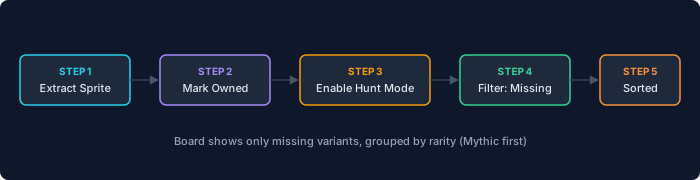
On the home page tracker, locate the filter bar above the sprite grid. Tap the "Hunt Mode" toggle. The grid instantly updates to hide every cell where you have already marked Owned. What remains is a shorter list of missing sprites, grouped by rarity tier — Mythic companions appear first, then Legendary, Epic, and Rare.
Hunt Mode works in combination with other filters. If you toggle both Hunt Mode and the "Season 4 Only" filter, the board shows only Season 4 sprites you have not yet extracted. Adding the "Gold" variant filter narrows it further to Gold variants you are missing. Each filter stacks, so you can build a highly specific extraction plan.
Using rarity sorting
Within the Hunt Mode results, sprites are sorted by rarity tier. This means the rarest missing companions appear at the top of the grid. If you are opening chests in a match and want to know which extraction has the highest priority, glance at the tracker — the first sprite in Hunt Mode results is the one you should grab if you find it.
Mythic sprites like Crown and Klombo are the hardest to find in chests. If Hunt Mode shows one of these at the top of your list, you know that match's chest loot is particularly valuable for your collection. Conversely, if only Rare sprites remain, you can focus on other gameplay goals knowing the common companions are easy to pick up later.
Combining Hunt Mode with the Missing filter
The "Missing" filter works similarly to Hunt Mode but without the rarity sort. Use Hunt Mode when you want priority ordering; use the plain Missing filter when you just want a quick count of how many sprites remain. Both can be toggled independently, and turning both on simultaneously is redundant — Hunt Mode already implies "show only missing."